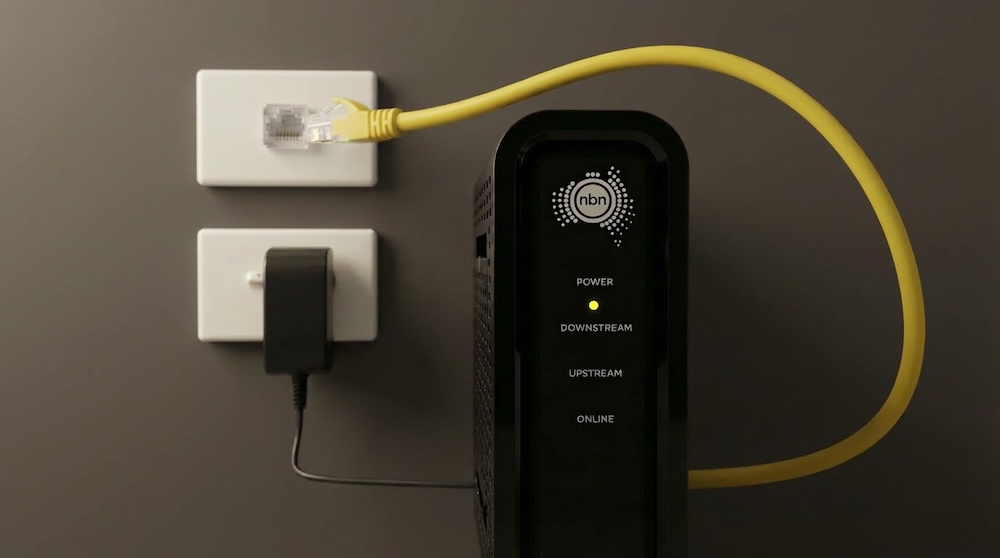
If you have NBN connected in your apartment or home but none of your data points seem to work, you are not alone. This is one of the most common problems in new builds and smart-wired homes. The NBN may be active at your modem, yet every wall socket stays dead.
The good news is that the fix is usually simple. If your NBN works but your data points don’t, it’s because your modem is not connected to your home’s in-wall cabling. The NBN box only delivers the internet to your modem, not directly to the wall ports. To activate those ports, you need to patch Ethernet cables from the modem’s LAN ports to the matching data point ports inside your wiring cabinet. Once patched, every room with a socket can access the internet.
This guide explains, in clear steps, how to connect NBN to data points, how smart wiring works, why wall ports don’t automatically have internet, and the exact setup installers use to make every point in the home active.
How Data Points Work
Many people assume wall data points work like power points, but they do not.
They are simply Ethernet cables running from each room to a central location, usually a cupboard or garage.
If you want a quick refresher on how these ports function, read this helpful explanation of what a data point is in a house.
The key thing to know is:
Data points only work when the other end of the cable is connected to the LAN ports of your modem or to a network switch.
If nothing is patched from your router to the patch panel, the wall ports will not work.
Why Your Data Points Aren’t Working
Your modem is plugged into the NBN box as instructed by your ISP. The internet works.
But the TV port, study port and bedroom port all appear dead.
This happens because:
Nothing is linking your router’s network to the in-wall cabling.
Your smart-wiring panel is passive until your router’s LAN ports feed those lines.
The fix is simple:
Patch a short Ethernet cable from each LAN port on your modem to each matching data point on the patch panel.
Once patched, your wall points become active immediately.
How to Connect NBN to Your Data Points
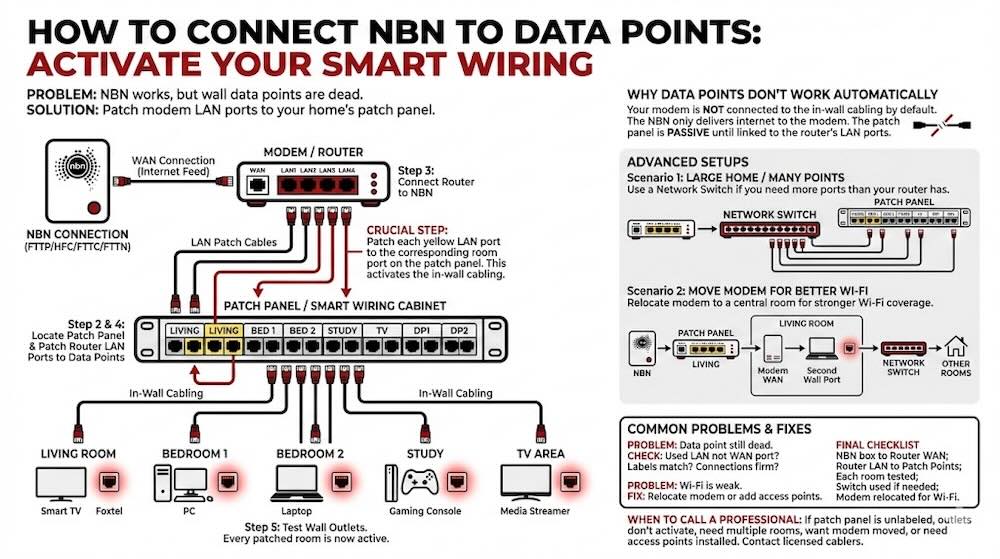
Here is the installer-level method used in new homes and apartments across Australia.
Step 1: Identify Your NBN Type
Your home will have one of these technologies:
- FTTP (you have an NBN NTD with UNI-D ports)
- HFC (Arris black modem)
- FTTC (NBN connection device with blue lights)
- FTTN/FTTB (modem connects to phone socket directly)
If your NBN box was installed in a cupboard or garage and you ever consider moving it, consult the following guides:
Step 2: Locate the Patch Panel or Smart Wiring Cabinet
In most new builds, all in-wall cabling terminates inside a cupboard, often near the NBN box.
You will see a row (or several rows) of RJ45 ports labelled:
- Living
- Bed 1
- Bed 2
- Study
- TV
- DP1 / DP2 / DP3
These labels correspond to each wall port in your home.
They are not active until patched to your modem/router.
Step 3: Connect Your Router to the NBN Box
This step is usually already done, but important to clarify.
For FTTP:
- UNI-D1 on the NBN NTD goes to the WAN port on your router.
For FTTC or HFC:
- The NBN device connects to your router’s WAN port.
For FTTN/FTTB:
- Your router connects directly to the telephone socket.
Step 4: Patch Your Router’s LAN Ports to the Data Points
This is the crucial step.
Your router has multiple LAN ports (usually yellow).
You must physically connect:
- LAN1 → Living room RJ45 on the patch panel
- LAN2 → Bedroom RJ45
- LAN3 → Study RJ45
Each LAN connection feeds internet into that room’s wall socket. Nothing complicated is required. It is purely a wiring link.
Step 5: Test the Wall Outlets
Go to each room and plug in:
- A smart TV
- Foxtel iQ
- PC
- Laptop
- Gaming console
If it receives an internet connection, the room is active.
If not, check:
- The port label (some homes label poorly)
- That you did not accidentally patch into the router’s WAN port
- That the correct wall socket was tested
Moving Your Modem to Another Room (Better Wi-Fi Method)
If your modem is stuck in a cupboard or garage, your Wi-Fi will be poor. Smart wiring allows you to relocate the modem easily.
Here is how:
Method: Move the Modem to the Living Room
- Patch UNI-D1 → Living room cable at the patch panel
- Go to the living room
- Plug the living room wall port into the modem’s WAN port
- Take another Ethernet cable from the modem’s LAN port back into a second wall port (if available)
- At the patch panel, patch that second line into a network switch
- Connect all other rooms to the switch
This gives you strong Wi-Fi in the centre of the home, while still activating every data point.
What If You Have a Large Home or Many Data Points?
If your home has more than four data points, your router will not have enough LAN ports. Solution: Install a small network switch.
How to wire it:
- Router LAN port → Switch Port 1
- All patch panel ports → Remaining switch ports
This activates every data point through a single network.
This is common in new homes with 8, 12, or even 20 Ethernet runs.
Common Problems and Fixes
The data point still does not work
Check:
- You used a LAN port, not the WAN port
- Labels are correctly matched
- Patch panel connections are firm
Wi-Fi is weak
If your modem is in a cupboard, performance will always be poor.
You can improve this by relocating your modem or installing ceiling-mounted access points.
If you need professional help, see:
The NBN box is in the wrong place
If you wish to move hardware for better coverage or layout, see our NBN box relocation page.
Only licensed cablers should relocate NBN infrastructure.
When to Call a Professional Installer
You should get expert help if:
- Your patch panel is not labelled
- Your wall outlets do not activate after patching
- You need multiple rooms running at once
- You want the modem moved for better Wi-Fi
- You want permanent access points installed
- You want a tidy, professional network setup
We provide full data cabling and networking services including data point installation in Perth.
Our licensed technicians specialise in:
- Smart wiring
- NBN setup
- Hard-wired networking
- Router and switch installation
- High-performance Wi-Fi upgrades
Final Checklist
- NBN box connects to the router’s WAN port
- Router LAN ports are patched to the data points
- Each room is tested
- A network switch is used if you have many data points
- The modem is relocated if Wi-Fi performance is poor
Once wired correctly, every room in your home will have reliable internet through Ethernet.