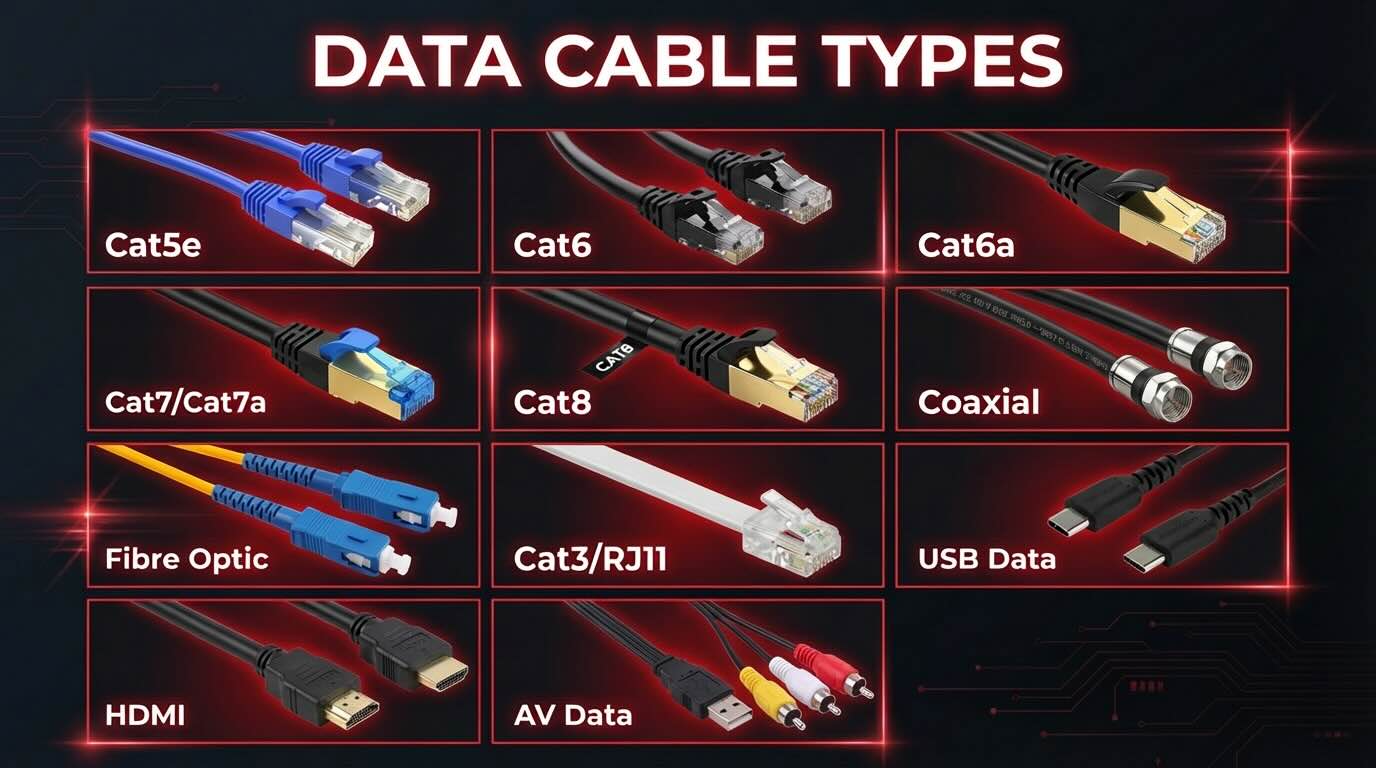
Understanding the different types of data cables is essential when planning a home network, business IT system, CCTV setup, NBN connection, or smart building installation. Choosing the wrong cable can limit speeds, cause interference, or lead to expensive rework later.
This guide explains every major data cable type used in Australia, how each one works, where it is best used, and how to choose the right option for long-term performance.
The Different Types of Data Cables
This guide breaks down the different types of data cables used across Australian homes and businesses. Jump straight to the cable type you need below:
- Category 5e (Cat5e)
- Category 6 (Cat6)
- Category 6a (Cat6a)
- Category 7 and 7a (Cat7 / Cat7a)
- Category 8 (Cat8)
- RG6 Coaxial Cable
- Single-Mode Fibre (SMF)
- Multi-Mode Fibre (MMF)
- Cat3 and RJ11 Cabling
- USB Data Cables
- HDMI and AV Data Cables
What Are Data Cables?
Data cables are physical cables used to transmit digital information between devices. That information could be internet traffic, phone calls, video feeds, access control signals, or internal network data.
In Australian installations, data cables are commonly used for:
- Internet and local area networks (LAN)
- NBN and Starlink distribution
- CCTV and security systems
- VoIP phone systems
- Smart homes and automation
- Office networking and server rooms
- Industrial and warehouse systems
Different applications require different cable types, shielding levels, and performance ratings.
Twisted Pair Ethernet Cables
Twisted pair cables are the most common data cables used in Australia today. They consist of pairs of copper wires twisted together to reduce interference.
Category 5e (Cat5e)
Cat5e is an enhanced version of the older Cat5 cable and is still widely installed in existing homes and offices.
Key features
- Supports speeds up to 1 Gbps
- Maximum run length of 100 metres
- Affordable and easy to install
Common uses
- Older homes
- Basic internet connections
- Simple office networks
Limitations Cat5e is nearing the end of its practical lifespan. While it works, it does not future-proof a property for higher internet speeds or modern network demands.
Category 6 (Cat6)
Cat6 is now the most commonly installed data cable in Australian residential and small commercial builds.
Key features
- Supports up to 10 Gbps over short distances
- Better insulation and reduced crosstalk compared to Cat5e
- Reliable for modern NBN plans
Common uses
- New homes
- Renovations
- Small offices
- CCTV systems
- Smart wiring installations
Why it is popular Cat6 offers a strong balance between cost, performance, and future readiness, making it a safe default choice for most projects.
Category 6a (Cat6a)
Cat6a is designed for higher performance environments where interference control and speed consistency matter.
Key features
- Full 10 Gbps support at 100 metres
- Thicker insulation
- Often shielded to reduce electrical noise
Common uses
- Commercial offices
- Warehouses
- Medical facilities
- Server rooms
Things to consider Cat6a cables are thicker and stiffer, which can make installation more complex in tight wall cavities.
Category 7 and 7a (Cat7 / Cat7a)
Cat7 cables are heavily shielded and designed for high-interference environments.
Key features
- Excellent noise protection
- High bandwidth capability
- Individually shielded wire pairs
Common uses
- Industrial environments
- Data centres
- Specialised commercial systems
Australian context Cat7 is rarely required in homes and is often unnecessary unless specified by engineers or equipment manufacturers.
Category 8 (Cat8)
Cat8 is designed for short-distance, ultra-high-speed data transfer.
Key features
- Supports up to 40 Gbps
- Maximum run length around 30 metres
- Heavy shielding
Common uses
- Data centres
- High-performance server racks
Not suitable for General residential or office cabling due to distance limits and cost.
Coaxial Cables
Coaxial cables were historically used for data and television transmission and are still relevant in some Australian systems.
RG6 Coaxial Cable
Key features
- Central copper conductor
- Shielding against interference
- Durable and long-lasting
Common uses
- TV antennas
- Foxtel connections
- Some NBN HFC installations
- CCTV systems (older analogue)
While coax is being phased out for networking, it remains common in antenna and legacy systems.
Fibre Optic Cables
Fibre optic cables transmit data using light rather than electricity, making them extremely fast and immune to electrical interference.
Single-Mode Fibre (SMF)
Key features
- Very long-distance transmission
- Extremely high speeds
- Thin core
Common uses
- NBN fibre connections
- Inter-building links
- Industrial and commercial networks
Multi-Mode Fibre (MMF)
Key features
- Shorter range than single-mode
- Lower cost for internal networks
- Thicker core
Common uses
- Office buildings
- Server rooms
- Campus-style installations
Why fibre matters in Australia As NBN fibre rollouts expand and internet speeds increase, fibre is becoming the gold standard for backbone connections.
Telephone and Legacy Data Cables
Cat3 and RJ11 Cabling
These cables were traditionally used for landline phones and ADSL internet.
Current relevance
- Still found in older homes
- Not suitable for modern internet speeds
- Often replaced during upgrades
USB Data Cables
USB cables are short-range data cables used for connecting devices rather than structured cabling.
Common types
- USB-A
- USB-B
- USB-C
- Micro-USB
Typical uses
- Computers and peripherals
- Printers
- Cameras
- Charging and data transfer
USB cables are not used for building-wide networking but are essential for device connectivity.
HDMI and AV Data Cables
While not traditional network cables, HDMI and AV cables carry digital data signals.
Common uses
- Home theatres
- Boardrooms
- Digital signage
- PA systems
These cables are often installed alongside structured data cabling during audiovisual fit-outs.
Shielded vs Unshielded Data Cables
Unshielded Twisted Pair (UTP)
- Most common
- Lower cost
- Suitable for homes and small offices
Shielded Twisted Pair (STP)
- Extra protection against interference
- Required near electrical equipment
- Common in commercial environments
Choosing shielding depends on the electrical environment and cable run location.
Solid Core vs Stranded Core Cables
Solid Core
- Used for permanent installations
- Better signal performance over distance
- Installed inside walls and ceilings
Stranded Core
- More flexible
- Used for patch leads
- Not suitable for long runs
Professional installations almost always use solid core cabling for infrastructure.
Australian Standards and Compliance
In Australia, data cabling must comply with regulations and standards, including:
- ACMA cabling rules
- Proper labelling and testing
- Separation from electrical wiring
- Licensing requirements for installers
Improper installations can cause interference, safety risks, and insurance issues.
How to Choose the Right Data Cable
When selecting between the different types of data cables, consider:
- Internet speed requirements
- Distance of cable runs
- Electrical interference risk
- Future expansion
- Budget and long-term value
For most Australian homes and small businesses, Cat6 offers the best balance of performance and cost. Commercial and high-demand environments often require Cat6a or fibre.
Ask an Expert What Type of Data Cabling You Should Use
Understanding the different types of data cables helps ensure your network is fast, reliable, and future-ready. Whether you are building new, upgrading, or expanding, choosing the right cable from the start prevents costly issues later.
If you are planning structured cabling, smart wiring, or network upgrades, professional assessment ensures the right cable is used for each application and complies with Australian standards.
For more guidance on data cabling and structured network installations, get in touch with out residential data cabling and commercial data cabling experts.